Download GameLink
The GameLink are all portable programs, Free to Use and frontend Utilities of the embedded to Windows (7 and higher) MKLINK console command (cmd).
With GameLink.exe & GameLink Console.exe you can move easy any installed Game or Application to another Drive inside your Computer by replacing the location of it with a Special Link (Symlink) that acts like the directory of your Game or Application never moved.
This way you can save hard disk space on C: Drive, time and money by using your old Hard/SSD Disks for Gaming or Application Repositories for your installed Programs without the need to uninstall them for ever!
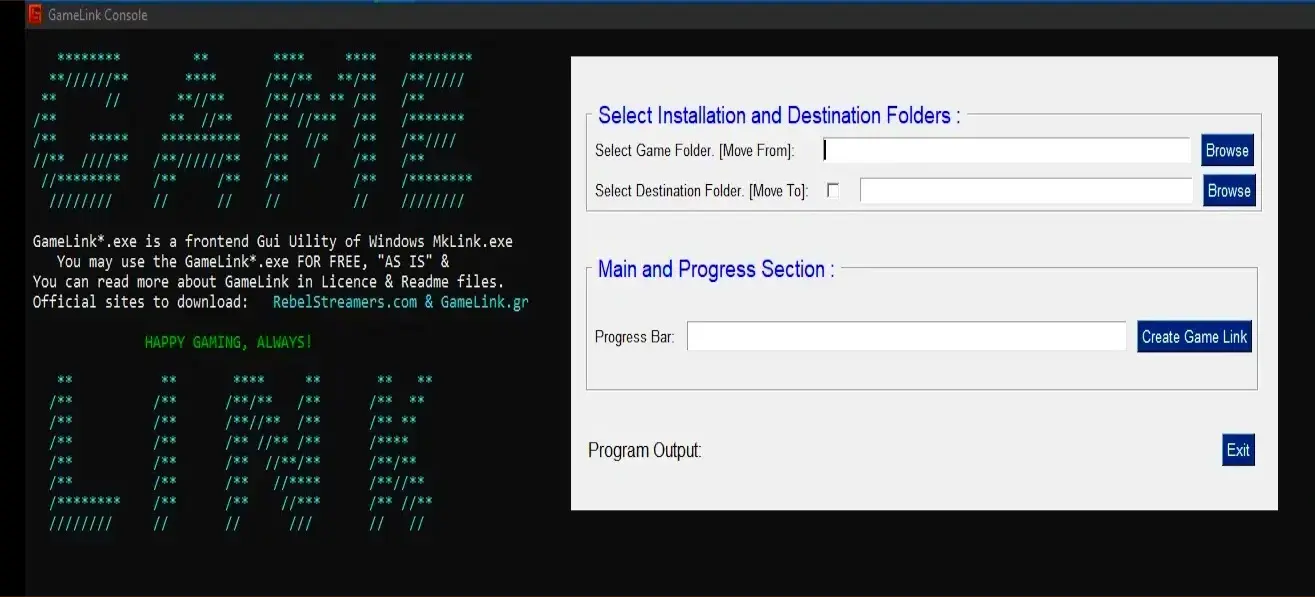
If you want to learn about the usage,the requirements, the possibilities, the features and the restrictions of GameLink Apps, read the previous blog post or just visit the GameLink blog where you can find more guides including video guides how to use GameLink to move your Games to another Drives inside your PC or How to Move your Games to a New PC
For example you can learn and watch How to Move Epic Games to Different Disks without unistalling your Games or How to Move Epic Games to a New PC Without Re-Downloading them and with different but easier way than Epic suggests with... GameLink Apps of course.
That's all folks, Happy Gaming Always!!!

Validate Your Downloads
These are the Hash files of the GameLink Zip Packages you are already Downloaded
To Verify the zip files, use this command in a cmd for MD5: certutil -hashfile GameLink.zip MD5

Downloads Statistics
Here you can see how many times GameLink.zip file requested. The Official Links are only the links you will find in GameLink.gr and RebelStreamers.com.
GameLink 64bit Zip file link requested:
GameLink 32bit Zip file link requested:

Looking For Host/VPN/Domain in Greece?
You liked this app, you want to support me and you are looking for Host/Vpn in Greece? Visit my hosting/domain site 👇 that is the 1st registrar in Greece and pick one Plan that is best for you. The Performance of this site speaks volume!
My Hosting SiteWhat is the NoTails..Tails Menu And How to Have a shared Partition with Windows, Mac and Android on Tails OS.
The NoTails.. Tails Menu from GameLink.gr is an open source zenity modular script for the famous Tails OS Live anonymizer USB that is based on Debian Distribution of Linux. The NoTails.. Tails Menu for Tails OS is free and open source like Debian and without any guarantee. That means that you can read and modify NoTails.. Tails Menu for personal use only and share it based on the restrictions of AGPLv3 License to remain free and open source.
The phrase (φράση) NoTails.. Tails Menu is a logopaignio (=> λογοπαίγνιο = play of words) and it is actual: [Not only for Tails a].. Tails Menu since the main purpose for creating this zenity script wasn't to oppose the Tails OS but to improve it, expand it to be useful for the Debian Desktops too with Tor - Tor Browser (the 2 programs is heavily depended the Tails OS) or even without Tor.
Along with this comes the YWC downloader which is the independed version of the 5th command and script of NoTails.. Tails Menu to use it alone as a quick and easy to use GUI utility for your files and videos downloads on your Tails OS USB or your Linux Desktops with or without Tor.

With NoTails.. Tails Menu zenity script (you see on the image how it looks in white and dark background), you can quickly bring Tails OS desktop to the appearance and status you want but also you can change it as many times you want with the first script. The first script has also the ability to save your preference settings so you don't have to ask every time. Apart of the appearance of Tails OS the first script manages many settings of the desktop and the PC you run it like Wifi and the UFW Firewall that i have included as an additional protection to existent Ferm. If you have already install the UFW, the first script also adjusts the Tor settings according to your preferred function role for the Tails OS usb, i.e. as client or as server and finally opens the Wiki of Tor with Tor Browser, the system monitor and a terminal screen where you can monitor your network connections every second.
Of course the first script is not the only one and i will briefly mention what are doing all the scripts that are initial available to you... The 1st script brings fast the Tails OS to your measurement and in full force. The 2nd script installs extra programs, update all the existent and shows you the security updates via the upgrade function of apt (on Linux Desktops it installs them if you want). The 3th script controls and manages the Tor Service. The 4th script opens to read your RSS Feeds to your desktop. The 5th script is a mini downloaded manager for files and video. The 6th script opens the wireshark the best packet analyzer. The 7th script opens a multitude of tabs with useful screens with which you can monitor the Tor network and the apps they are connect to it (also the tcpdump that is like the wireshark for terminals). And the 8th script shows you the time in various cities in the world every 10 seconds that give us the ability to add any time city you want easy!
However, what helps most of all by running the NoTails-Tails-Menu.sh zenity script is that you don't have to enter the Administrator password (the amnesia's sudo) every time, but only if you close and reopen it, something that i am sure the heavy Tails OS users will appreciate. The same also happens to Linux where you can use the sudo zenity login for your own scripts!
But the most important feature of NoTails.. Tails Menu is that it speaks your ... Language and makes the Tails OS to speak your language too after you add it in the 1st script ... and any language version of the program you want with the 2th script. For this You just have to add the ibus or the xkb of the language you want to the first script and the name of the program for the language version of the program you want to install inside the second script to have a full working Tails OS in your language!
That's all Privacy Friends in Digital Era and Ancient Greek's Language Lovers that is one of the two languages from which is based the English Language. More about this you can find in the Prolog of NoTails.. Tails Menu article from GameLink.gr. With the previous link for the blog article you will read how to install it in Tails and Linux, from where you can also download it, how to use it in Tails and Linux, how to connect and solve connection problems in Tor and also how to have shared Partition on Tails with your Windows or your mobile Phone. Good RebelStreams aka Truth Streams that always "travel" against the "wave" of the epoch we live, Always!
If you finally want to learn more and detailed info about this project continue reading the blog article guide of NoTails.. Tails Menu . In the pre-last header you will learn how you can help this open source zenity project easy and ... inexpensive first of all !